General navigation
:::info Open it in ZonaCNC 👉 Go to the ZonaCNC homepage → :::
Before you start searching for your machine, it helps to get familiar with the main areas of ZonaCNC. This guide walks you through the top navigation bar (header) and the footer so you can move around the portal with ease.
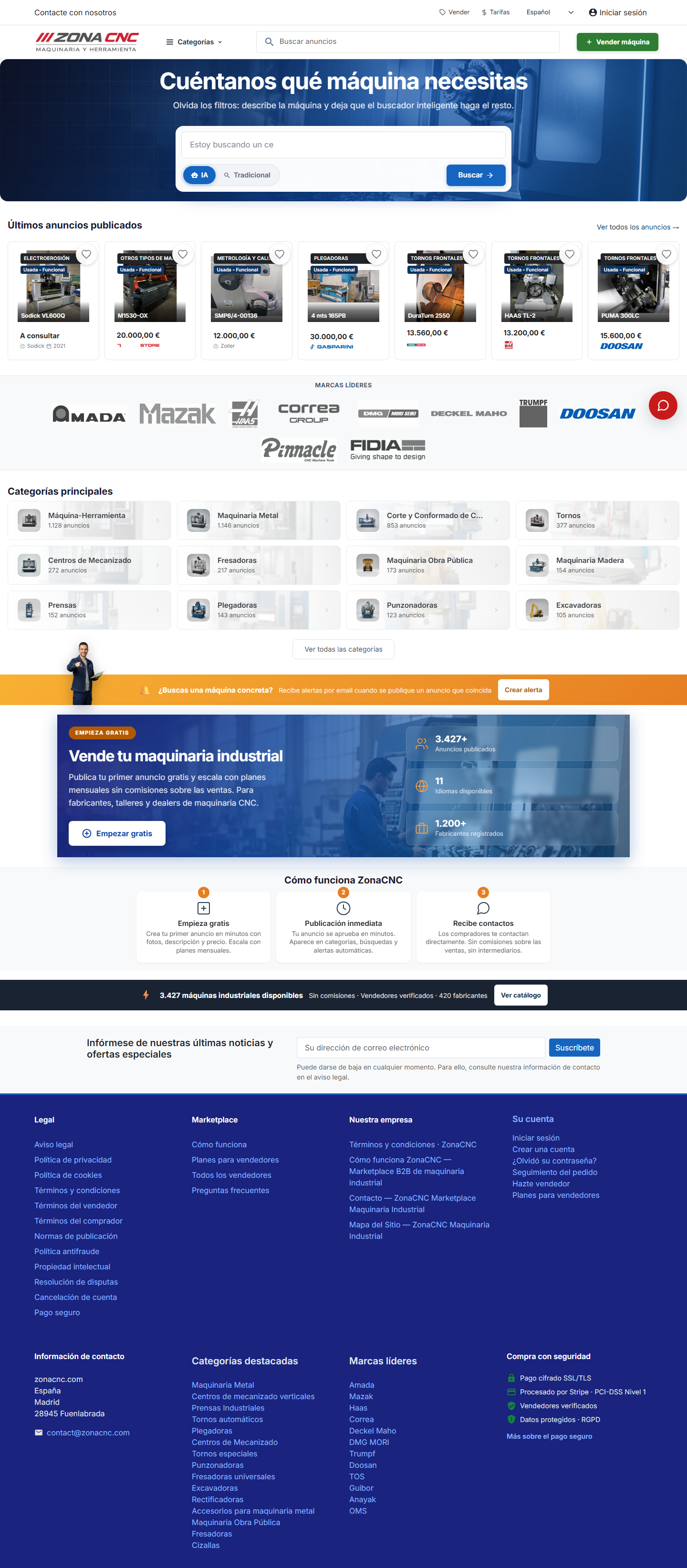
The top navigation bar (header)
At the top of every page you will find the most important access points:
- ZonaCNC logo: click on it at any time to return to the homepage.
- Categories (Categorías): opens a mega-menu organised by machinery families. This is the easiest way to browse the catalogue by machine type.
- Search listings (Buscar anuncios): the search bar where you type what you are looking for — a machine type, a brand, a model — and view the results.
- Sell (Vender): the entry point for publishing your own listings if you are a seller.
- Pricing (Tarifas): view the available plans and prices for selling on the portal.
- Sign in (Iniciar sesión): log in to your account or register.
- Contact us (Contacte con nosotros): reach the ZonaCNC team if you need help.
The footer
At the bottom of every page you will find useful quick-access links:
- Featured categories (Categorías destacadas): direct links to the most relevant machinery families.
- Leading brands (Marcas líderes): quick access to major manufacturers so you can search by brand at a glance.
:::tip Tip If you already know what type of machine you are looking for, use Categories; if you have a specific model or brand in mind, go straight to the search bar. Combining both is the fastest way to find what you need. :::
Tips
- Always click the logo to start a fresh search from scratch.
- Browse the leading brands in the footer if you have a preference for a particular manufacturer.
- If you get lost or need help, use "Contact us".